
By Alex Morgan, Senior AI Tools Analyst
Last updated: May 24, 2026
Why My Two-Part Desk Setup in 2025 Could Redefine Remote Work Efficiency
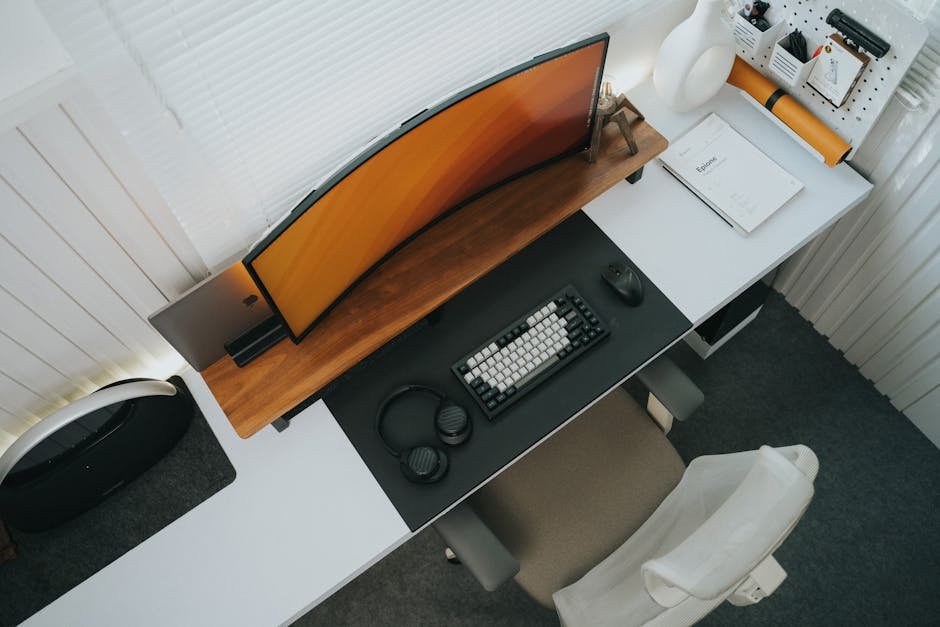
In 2025, my workspace configuration will consist of dual monitors—an innovation projected to increase productivity by as much as 30%, according to research from the University of Utah. While many professionals still cling to traditional desk setups, they underestimate how the synergy between physical ergonomics and digital tools can dramatically enhance performance. As Artificial Intelligence (AI) becomes increasingly integrated into our workflows, the design of our workspaces must also evolve to utilize these advancements effectively.
Optimizing your workspace is more than merely choosing the right desk; it’s about creating a holistic environment that combines comfort, efficiency, and technological integration. This is not just a trend; it is a necessity, as hybrid work models become increasingly popular around the globe. Statista reports that 54% of employees now prefer a hybrid working model, underscoring the urgency for optimizing at-home work environments.
This article explores how a two-part desk setup represents a paradigm shift in workplace ergonomics and productivity, ultimately merging cutting-edge AI tools with human-centric design.
What Is Workspace Optimization?
Workspace optimization refers to the thoughtful arrangement of physical and digital elements to enhance employee comfort and productivity. In the context of remote work, it emphasizes the effectiveness of a well-designed home office to accommodate the evolving dynamics of work tools and ergonomics. For example, think of optimizing a workspace like optimizing a sports team; each player’s role—whether physical or digital—must synergize for the collective goal of performance excellence.
This is particularly relevant as AI tools become integral to many tasks and workflows, making it essential that our physical environments support these technological advancements. For insights into the transformative impact of AI technologies, you can check out the exploration of LLMs and how they are reshaping AI strategies in various industries.
How Workspace Optimization Works in Practice
Multiple organizations have already begun to recognize the productivity revolution possible through optimized workspace configurations.
Dell’s recent initiatives focus on dual-monitor solutions, demonstrating that multitasking is significantly improved with two displays. Their comprehensive studies indicate that users completing tasks with a dual-monitor setup finish projects at rates nearly 25% faster compared to those using single monitors. By facilitating an environment that allows for simultaneous data analysis and content creation, Dell’s strategy showcases a clear marriage between productivity and ergonomics.
Meanwhile, Google has invested in ergonomic furniture, reporting that such investments lead to a 30% reduction in workplace injuries. Comfort isn’t merely an aesthetic preference; it’s a crucial component of efficiency and employee satisfaction, which resonates with the ideas explored in strategies surrounding AI accountability.
Another interesting case study comes from Apple, whose design philosophy emphasizes user-friendly interfaces. Their ergonomic and intuitive layouts align perfectly with the need for seamless integration between physical setups and the digital tools professionals now rely upon. As remote work environments shift towards personalized solutions, design and functionality must coexist harmoniously.
Real-world impacts from these configurations are tangible. Harvard Business Review cites research suggesting that well-designed workspaces can lead to a 25% increase in employee satisfaction and retention, signaling an urgency for companies to reconsider their ergonomic strategies.
Top Tools and Solutions
When designing an optimized workspace, specific tools can enhance functionality:
- Uniqode — This platform offers QR code generation and digital business cards, perfect for professionals who want to streamline networking.
- Marketing Blocks — AI-powered marketing content creation platform that helps businesses produce targeted content effectively.
- HighLevel — All-in-one sales funnel, CRM, and automation platform for agencies and entrepreneurs looking to streamline their operations.
- Typeform — Interactive form and survey builder that enhances user engagement and feedback collection.
- BlackboxAI — AI coding assistant and developer tool, ideal for programmers looking to boost efficiency in coding tasks.
- Money Robot — This tool generates unlimited web 2.0 backlinks automatically and creates spun blogs on autopilot, which is great for SEO strategies.
These tools enhance productivity and offer practical solutions for every stage of remote work.
Common Mistakes and What to Avoid
-
Neglecting Ergonomics: Many professionals overlook the importance of ergonomic design, leading to discomfort and decreased productivity. An example can be seen with a tech startup whose employees reported increased back pain, resulting in reduced work efficiency and increased absenteeism.
-
Inadequate Space Configuration: Failing to consider the layout can severely limit one’s productivity. A major enterprise found that employees working in cramped environments were less engaging during meetings, leading to lost collaboration opportunities.
-
Ignoring Digital Tools: Many professionals still rely heavily on outdated one-size-fits-all digital interfaces and miss out on tailored solutions that enhance their workflows. A marketing firm that resisted investing in a dual-monitor setup discovered that they were completing projects slower than competitors who embraced modern setups.
Mistakes like these reveal that merely having space isn’t enough if that space isn’t thoughtfully optimized.
Where This Is Heading
The future of workspace optimization will be heavily influenced by emerging trends in both AI integration and ergonomic design.
Trend 1: Hyper-Personalization — According to Forrester Research, the demand for customized workspace solutions will grow by 15% each year, as employees increasingly seek setups tailored to their specific needs.
Trend 2: Integration of AI Solutions — By 2026, 70% of remote workers will leverage AI tools for enhanced productivity, according to a report by McKinsey. This suggests that investment in intelligent work environments will become critical for competitive advantage. For more details on future trends in AI, consider exploring how LLMs are expected to revolutionize industry practices.
These trends indicate that professionals should expect their home offices to become more than just workspaces. They will evolve into personalized productivity hubs. Understanding this shift now empowers individuals to prepare accordingly and take full advantage of the resources available.
FAQ
Q: What is workspace optimization?
A: Workspace optimization is the strategic arrangement of both physical and digital components to enhance productivity and comfort. It focuses on creating environments that leverage technology and ergonomic design for better performance.
Q: How can I optimize my remote workspace?
A: To optimize your remote workspace, consider investing in ergonomic furniture, dual monitors for multitasking, and organizing your digital tools efficiently. These changes can significantly enhance your productivity.
Q: What are the benefits of a two-part desk setup?
A: A two-part desk setup allows for increased flexibility and organization, enhancing multitasking capabilities, which can lead to higher productivity. It can accommodate various tasks simultaneously, providing an efficient workflow.
Q: What costs are involved in optimizing a workspace?
A: The costs can vary widely depending on the extent of changes made, ranging from simple ergonomic accessories to full-scale renovations. Budgeting for quality ergonomic furniture and necessary technological upgrades is essential for long-term benefits.
Q: How can AI tools be integrated into my workspace?
A: AI tools can be integrated by utilizing software that automates repetitive tasks, organizes workflow, or enhances communication. Investing in AI technology is crucial to maximizing productivity, with substantial benefits demonstrated by early adopters.
Q: What common mistakes should I avoid when optimizing my workspace?
A: Common mistakes include neglecting ergonomic design, poorly configured layouts, and not utilizing digital tools effectively. Each mistake can severely limit productivity, so careful planning is necessary.
Q: What are the future trends in workspace optimization?
A: Future trends include hyper-personalization of workspace setups and deeper integration of AI tools. As work environments evolve, understanding these shifts will help professionals adjust accordingly.
Q: What is the best tool for creating a productive workspace?
A: The best tool can vary based on individual needs; however, platforms like Marketing Blocks for content creation and HighLevel for CRM and automation are excellent choices to boost productivity in your workspace.